CoreviaFlowCOREVIAFLOWDIGITAL PROJECT COMPANY Leave a request
EN UA RU
E-commerce platformsUS

Amazon integration & automation

Orders from your Amazon seller store become deals in the CRM as soon as Amazon reports them, stock in Amazon's warehouses shows on the product card, and the manager sees every status change without opening a second tab.

An Amazon seller store lives by its own rules: orders arrive around the clock, buyers ask to cancel, the goods sit in Amazon's warehouses, and the seller panel is the only place where all of it can be seen. When the same company also sells from its own site and takes calls, the manager ends up switching between windows and retyping order numbers. The connection uses Amazon's own interface for sellers: Amazon itself sends a notification when an order changes, the order appears in the CRM as a deal with its lines and status, warehouse stock shows on the product card, and listing changes go from the CRM back to the store. The buyer's name, address and phone appear in the CRM only if you ask Amazon for that permission separately.

What we connect

  • We start with Amazon's developer registration, because without it nothing outside Amazon can read a single order. A connection used only inside your own company is registered as a private developer, and Amazon reviews the application before it opens access; we prepare the answers, you submit them from your seller account.
  • Amazon grants access by type of data: orders, warehouse stock and listings are each a separate permission that has to be requested and approved. We list only the permissions the CRM really needs. The buyer's name, address and phone are a separate, stricter permission, so we decide together whether the CRM needs them at all.
  • You, as the seller, grant the connection access to your store yourself through Amazon's standard authorisation screen — nobody's login and password are handed over, and the access can be withdrawn from the same account. Amazon keeps Europe, North America and the Far East on separate addresses, so we point the connection at the region of your store.
  • We map the order to the deal: order lines to CRM products, order status to the deal stage, the store and region to the deal fields, the Amazon order number to the deal title. If the buyer-data permission is approved, the buyer gets a client card; if not, the deal is linked by order number and the buyer stays anonymous in the CRM.
  • We subscribe to Amazon's order-change notifications: Amazon itself sends a message when an order changes, including a buyer's request to cancel, and we subscribe only to the change types you care about. Amazon allows roughly one order search every three minutes, so notifications are the main flow and a rare re-read only catches what was missed.
  • We bring warehouse stock to the product card — available for sale, on its way, reserved and unsellable, for each store region — and agree which listing changes go from the CRM to Amazon: creating a listing, updating part of it, or removing it. Then we run in parallel with your current routine, compare, and only then switch the routine off.

Automation scenarios

01

A status change reaches the CRM as soon as Amazon reports it

Before the manager refreshes the Amazon seller panel between calls, and a buyer's request to cancel is noticed after the parcel has already been packed.

After Amazon itself sends a notification about the change, the deal in the CRM moves to the new stage, and a cancellation request shows up on the deal as a task before anyone touches the goods.

02

What is really in Amazon's warehouse, on the product card

Before the manager quotes 'in stock' from memory, not knowing that half of it is reserved for open orders and a box is still on its way to the warehouse.

After the product card in the CRM shows, for each store region, what is available for sale, what is on its way, what is reserved and what is unsellable, straight from Amazon's warehouse data.

03

Listing changes are made once, in the CRM

Before a new product or a corrected description is entered in the CRM, then retyped into the Amazon listing by hand, and the two drift apart within a month.

After the CRM creates the listing in your Amazon store, sends partial updates when a field changes, and removes the listing when the product is retired, so the store and the CRM say the same thing.

04

Amazon orders next to orders from your own site

Before Amazon orders live in the seller panel, site orders in the shop admin, and the weekly sales picture is assembled from two exports.

After both channels are deals in one CRM, filtered by source, and the report by product and by channel is one screen. Whether an Amazon buyer gets a full client card depends on the separate buyer-data permission from Amazon.


How it works technically

For those who want to check: each point links to the official documentation page it comes from.

  • Orders of a seller store are read through Amazon's official interface for sellers, which Amazon itself intends for synchronising orders with outside systems; orders can be selected by creation or update period, and each order returns its lines and status.

    Source: developer-docs.amazon.com ↗ checked 2026-09-28
  • Instead of constant checking, Amazon itself sends a notification about an event the connection has subscribed to.

    Source: developer-docs.amazon.com ↗ checked 2026-09-28
  • An order-change notification arrives on every change of order status, including a buyer's request to cancel, and the connection can subscribe only to the change types it needs.

    Source: developer-docs.amazon.com ↗ checked 2026-09-28
  • Stock in Amazon's warehouses is available in real time for each store region: available for sale, on its way, reserved and unsellable.

    Source: developer-docs.amazon.com ↗ checked 2026-09-28
  • Listings can be created, updated fully or in part, and removed for a specific seller and a specific Amazon store.

    Source: developer-docs.amazon.com ↗ checked 2026-09-28
  • Access to store data is granted by the seller explicitly, through standard authorisation; a connection used only inside one company is registered with Amazon as a private developer.

    Source: developer-docs.amazon.com ↗ checked 2026-09-28

Limits

Before anything is connected, the developer registration must pass Amazon's review, and access is granted by type of data: each permission — orders, stock, listings — is requested and approved separately, and a request without the approved permission is refused. The buyer's name, address and phone are restricted data: they need a separate, stricter review, a separate temporary key for each request, and the connection must follow Amazon's Data Protection Policy, including deleting buyer data no later than 30 days after it was received. Searching orders is allowed roughly once every three minutes with a small reserve for bursts, so the main flow of orders comes through Amazon's own notifications, not through repeated checks; any request above Amazon's limits is refused with an error rather than queued. Europe, North America and the Far East are separate regions with separate addresses, so a store in each region is connected to its own region.

Screenshots

Sell on Amazon: Seller Central on a tablet
Seller Central is where orders and listings are managed; the Selling Partner API gives a CRM the same data programmatically. Source: sell.amazon.com ↗
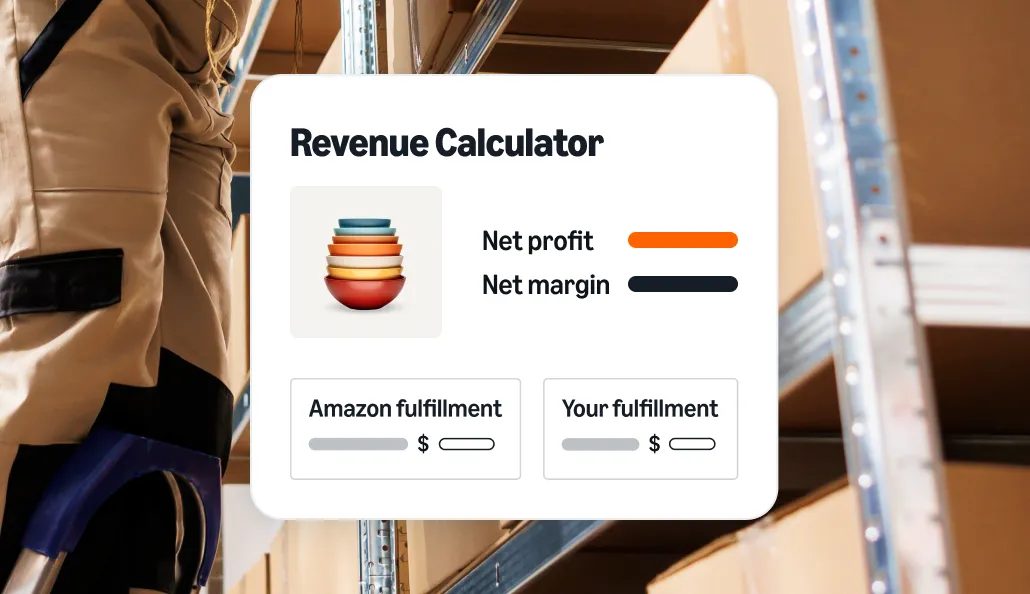
Amazon revenue calculator: net profit and fulfilment comparison
Amazon's own calculator compares Amazon fulfilment with your own; order and inventory data from both can flow into the CRM. Source: sell.amazon.com ↗

How to start

Three steps from a first message to work on your project.

  1. 01

    Leave a request

    Describe the task in the form — in text or by voice. Budget and timing are optional.

  2. 02

    We review and estimate

    A developer studies the brief, asks about anything unclear and sends an estimate.

  3. 03

    We start

    Once scope and price are agreed, the work begins.

or write to info@coreviaflow.space

Questions

Do we have to register with Amazon as a developer ourselves?
Yes — the registration is tied to your seller account, and Amazon reviews it before opening access. A connection used only inside your company is registered as a private developer, which is the simpler of Amazon's two paths. We prepare the answers to Amazon's questions and the list of permissions; you submit the application and grant the access.
Will the CRM show the buyer's name, address and phone?
Only if Amazon approves the separate, stricter permission for buyer data, and then with Amazon's conditions: the data is fetched with a separate temporary key and deleted from the CRM within 30 days. If you do not need it, the deal is linked to the Amazon order number and the buyer stays anonymous in the CRM. We recommend deciding this before the registration, not after.
How quickly does a new order or a cancellation appear in the CRM?
As soon as Amazon sends its notification about the change — that is Amazon's own mechanism, and we subscribe only to the change types you need. We do not rely on asking Amazon again and again: Amazon allows roughly one order search every three minutes, so a rare re-read only catches anything a notification might have missed.
We sell in Germany and in the United States. Is that one connection or two?
Amazon keeps Europe and North America on separate addresses, so the connection is pointed at each region your stores are in, and warehouse stock is read for each store region separately. In the CRM both stores land in one place: deals carry the store and region as fields, and the product card shows stock per region.

Tell us what needs to be connected

Describe the task in text or a voice message. We look at your setup and reply with a plan.