CoreviaFlowCOREVIAFLOWDIGITAL PROJECT COMPANY Leave a request
EN UA RU
Marketing & EmailUS

Meta Lead Ads (Facebook / Instagram) integration & automation

A form filled in on Facebook or Instagram becomes a lead in the CRM within seconds, with an owner assigned and the first reply already on its way.

Lead ads are the ads with a form inside: a person taps, the form is already filled with the name and phone they gave Facebook, and the request lands in the ad account. That is where it usually stays — someone downloads a spreadsheet on Friday and calls people who asked on Monday. We connect the ad account to the CRM so that every submitted form becomes a lead the moment it is sent, goes to the right manager, and the first message reaches the person while they still remember what they asked for.

What we connect

  • We start from your Facebook Page and the ad account tied to it: which pages run lead ads, which forms are live, and who in the company is the page administrator. All leads belong to the page, including those from Instagram ads.
  • The page administrator grants the connection access to leads through the Meta business settings — no passwords change hands, and the access can be withdrawn from the same screen at any time.
  • We map every form field to a CRM field: name, phone, email, the city or product the person chose, and the ad and campaign the lead came from, so you can later see which ad brought paying clients.
  • We set the delivery mode: Meta notifies the CRM about each new form the moment it is submitted, and once a day the connection also re-reads the day's leads to be sure nothing was missed.
  • We agree the rules for a new lead: who gets it, which pipeline stage it starts in, what the first automatic message says and through which channel it goes — SMS, email or a messenger the client already uses. Messages to real people go live only after you approve the text.
  • We submit the connection for Meta's application review with the two permissions it needs and keep it in test mode until the review is through; during the test you see leads from your own test submissions in the CRM.
  • Optionally we close the loop: when a lead from the ad becomes a paid deal, the CRM reports it back to Meta so the ads learn to find people who buy rather than people who merely fill in forms.

Automation scenarios

01

The reply arrives while the person is still on Facebook

Before a form filled in on Tuesday evening waits in the ad account until Friday's export; by then the person has bought from whoever called first.

After the form becomes a lead in the CRM within seconds, the manager on duty gets a notification, and an automatic message with the next step goes to the person straight away.

02

Leads from three cities go to three managers

Before all forms land in one pile and the sales lead sorts them by hand every morning.

After the city the person chose in the form decides the owner in the CRM; a lead from Lviv goes to the Lviv manager the moment it arrives, and the sales lead sees only the ones nobody has picked up within an hour.

03

You see which ad brought paying clients

Before the ad report shows the cost of a form, the CRM shows revenue, and nobody can join the two.

After every lead carries the campaign and ad it came from into the CRM; the deal report is grouped by ad, and the campaign that brings cheap forms but no purchases is switched off with the numbers in hand.

04

Meta learns from your closed deals

Before the ad optimises for the number of forms, so it happily finds people who fill in forms and never answer the phone.

After when a lead is marked qualified or paid in the CRM, the connection reports it back to Meta; the ad starts looking for people who resemble those who actually bought.


How it works technically

For those who want to check: each point links to the official documentation page it comes from.

  • Meta describes lead ads as a quick and privacy-safe way for people to sign up to hear from a business; the form is mobile-friendly and uses the information people already shared with Facebook, which is why the contacts arrive accurate.

    Source: developers.facebook.com ↗ checked 2026-09-28
  • Meta's own documentation names the CRM scenario directly: leads received from Facebook can be set up to be updated into your CRM instantly.

    Source: developers.facebook.com ↗ checked 2026-09-28
  • There are two ways to collect leads: reading them in bulk a few times a day, or being notified about each new lead the moment it is submitted — Meta recommends the second for anything more frequent.

    Source: developers.facebook.com ↗ checked 2026-09-28
  • Leads from an ad shown on Instagram still belong to the Facebook Page, so one connection to the page covers both networks.

    Source: developers.facebook.com ↗ checked 2026-09-28
  • Information about which leads turned out to be quality leads can be sent from the CRM back to Meta, and Meta uses it to optimise the ads for quality rather than volume.

    Source: developers.facebook.com ↗ checked 2026-09-28
  • Leads can also be pulled for a chosen period by the time they were created, which is how we back-fill history when the connection goes live.

    Source: developers.facebook.com ↗ checked 2026-09-28

Limits

To read lead data the connection must pass Meta's application review with two specific permissions; the review is done by Meta, on Meta's schedule, and until it is through the connection stays in development mode, where it sees only test submissions from people with a role in the application. Reading leads also requires administrator access to the Facebook Page or specially granted lead permissions. Meta caps the number of requests per day depending on how many leads the page collected over the last 90 days; above the cap requests are refused until the next day, which is why we read in real time rather than by polling. Meta advises working on behalf of the page rather than a user, and warns that the lifetime of access keys may change without notice — the connection renews them itself. Meta does not promise a cost per lead, and neither do we.

Screenshots

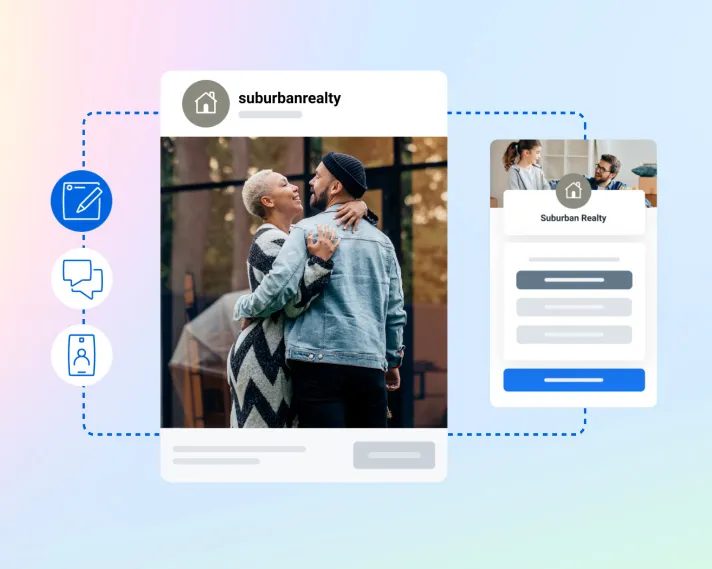
Meta lead ad flow: post, instant form and submitted contact
From ad to form to contact: each submitted form becomes a lead in the CRM. Source: www.facebook.com ↗
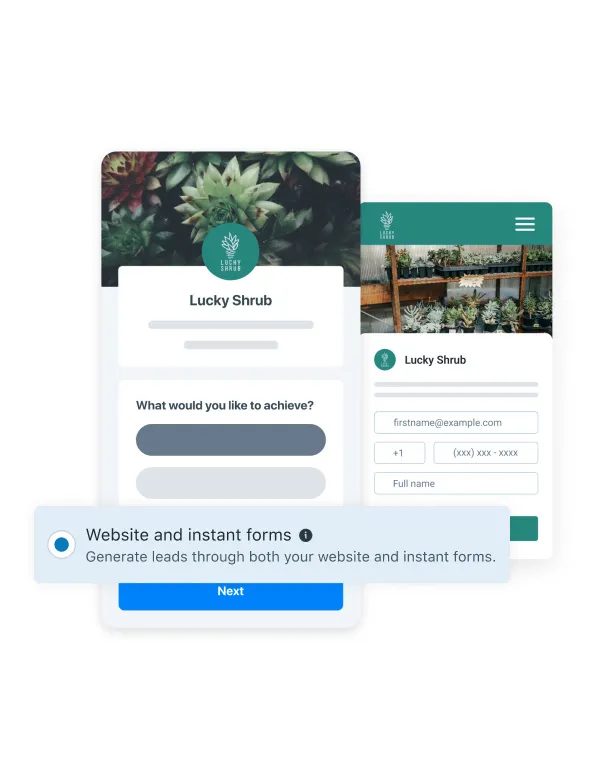
Instant form on a phone next to the advertiser's website
The instant form opens inside Facebook or Instagram, so the person never leaves the app. Source: www.facebook.com ↗

How to start

Three steps from a first message to work on your project.

  1. 01

    Leave a request

    Describe the task in the form — in text or by voice. Budget and timing are optional.

  2. 02

    We review and estimate

    A developer studies the brief, asks about anything unclear and sends an estimate.

  3. 03

    We start

    Once scope and price are agreed, the work begins.

or write to info@coreviaflow.space

Questions

How long does Meta's review take and can we start before it?
The review is done by Meta and we cannot promise its length. Before it is through, the connection works in development mode: your own test forms already flow into the CRM, so mapping, owners and messages are tested and ready. Real leads start flowing the day the review is approved.
We run lead ads on Instagram only. Does that change anything?
No. An Instagram lead ad still needs a Facebook Page, and the leads belong to that page. One connection to the page brings in forms from both Facebook and Instagram, and each lead records which network it came from.
Can the same lead come in twice?
Meta gives every submission its own number, and the CRM checks it before creating a lead. If the same person fills in the form again, the new submission is attached to the existing lead as a repeat request instead of creating a second card.
Will the automatic first message go out to real people without our approval?
Never. Messages to real clients are switched on only after you have read and approved the text, and until then the connection only creates the lead and notifies the manager.

Tell us what needs to be connected

Describe the task in text or a voice message. We look at your setup and reply with a plan.