CoreviaFlowCOREVIAFLOWDIGITAL PROJECT COMPANY Leave a request
EN UA RU
Marketing & EmailUS

Telegram integration & automation

The company's Telegram bot takes requests and answers clients, every conversation lands in the CRM, and the team gets alerts about new leads and overdue tasks in its own chat.

Telegram bots are small applications that run entirely inside Telegram: a client opens the bot, writes a message or presses a button, and the bot answers, asks the next question or shows a full screen with a catalogue or a form. For a company this is the fastest channel to reach: no app to install, the client already has Telegram. We build and connect the client's own bot to their CRM and other systems: a request from the bot becomes a lead with the client's name and the text of the conversation, a reply typed in the CRM goes back into the same chat, an order status changed in the CRM is sent to the client, and the team's group receives a short message when a new lead appears or a task is overdue. With Telegram Business the bot can also answer from the owner's personal account, so clients keep writing to the number they know. The bot, its name and its audience belong to the company; we set it up and connect it.

What we connect

  • We agree what the bot is for: taking requests, answering clients, sending order statuses, alerting the team — or several of these — and which CRM and other systems it must talk to.
  • The company creates the bot in Telegram through @BotFather under its own account — name, description, avatar — and hands us the access key; the bot stays the company's property and the key can be replaced at any time.
  • We set up the receiving side on the company's server or ours: Telegram itself delivers every message to the bot the moment it arrives, and the bot writes it to the right conversation in the CRM.
  • We design the conversation: the first questions, the buttons with ready answers, when to hand over to a person, and, if needed, a full screen inside Telegram for a catalogue, a form or a personal account.
  • We map the bot to the CRM: how a client is matched to a contact, which pipeline a new request goes to, how a reply from the CRM is sent back, and which CRM events go to the team's group.
  • If the company wants replies from the owner's personal account, we switch on Business mode for the bot and connect it in the owner's Telegram Business settings — the owner can disconnect it at any time.
  • We test on real conversations: a request, a reply from the CRM, an order status change, an alert to the group — and check each step lands where it should.

Automation scenarios

01

Requests from the bot become leads with the whole conversation

Before clients write to the bot, someone copies their messages into the CRM by hand once a day, and the details get lost.

After the bot asks what the client needs, when and where, and creates a lead in the CRM with the answers and a link to the chat; the manager replies from the CRM and the client sees the reply in the same bot.

02

Order status and delivery updates in the client's Telegram

Before clients call to ask where the order is, and the manager looks it up in the CRM every time.

After when the order moves to 'shipped' in the CRM, the bot sends the client the parcel number and a button to track it; a client can also press 'my orders' in the bot and get the list from the CRM.

03

The team's group as a control panel

Before the owner opens the CRM several times a day to see whether anything new came in.

After the bot posts to the team's group a short line for every new lead, every deal that moved to 'won' and every task overdue by more than an hour, with a link to the card; the owner sees the day's picture in Telegram without opening the CRM.

04

An AI assistant in the bot answers around the clock

Before the bot only says 'a manager will contact you' and clients leave.

After the assistant answers questions about products, availability and terms from the CRM and the catalogue, offers time slots, and when the question is beyond it, hands over to a manager with a summary of the conversation; the whole dialogue is saved in the lead.


How it works technically

For those who want to check: each point links to the official documentation page it comes from.

  • Telegram bots are small applications that run entirely within the Telegram app — the client installs nothing.

    Source: core.telegram.org ↗ checked 2026-09-28
  • Telegram Business users can connect a bot that processes and answers messages on their behalf via their personal account.

    Source: core.telegram.org ↗ checked 2026-09-28
  • Telegram can deliver each new message to the bot's server itself the moment it arrives, so the CRM sees the request within seconds.

    Source: core.telegram.org ↗ checked 2026-09-28
  • Whenever the bot sends a message it can show a keyboard with predefined reply options under it — so a client presses a button instead of typing.

    Source: core.telegram.org ↗ checked 2026-09-28
  • Bots can host Mini Apps — full screens inside Telegram for a catalogue, a form or a personal account — and unlike websites they get sign-in and notifications through Telegram out of the box.

    Source: core.telegram.org ↗ checked 2026-09-28

Limits

Telegram limits how fast a bot may write: no more than about one message per second in a single chat, no more than twenty messages per minute in a group, and about thirty messages per second for bulk notifications — so a mailing to thousands of clients is sent in a stream over minutes, not instantly, and the bot waits and retries when Telegram asks it to. Files sent through a bot are limited in size. If the bot's server is unreachable, Telegram keeps undelivered messages for a day at most, so a long outage means lost messages; we monitor the server and keep a scheduled check as a safety net. Receiving messages requires a server with a domain and one of the ports Telegram allows, and Telegram provides neither hosting nor domains — the company uses its own server or ours. Bot commands start with a slash and are short, and in groups a bot with privacy mode on sees only messages addressed to it, which is usually what a company wants. Telegram also offers paid broadcasts and payments in Telegram Stars; these involve Telegram's own terms and are agreed separately.

Screenshots

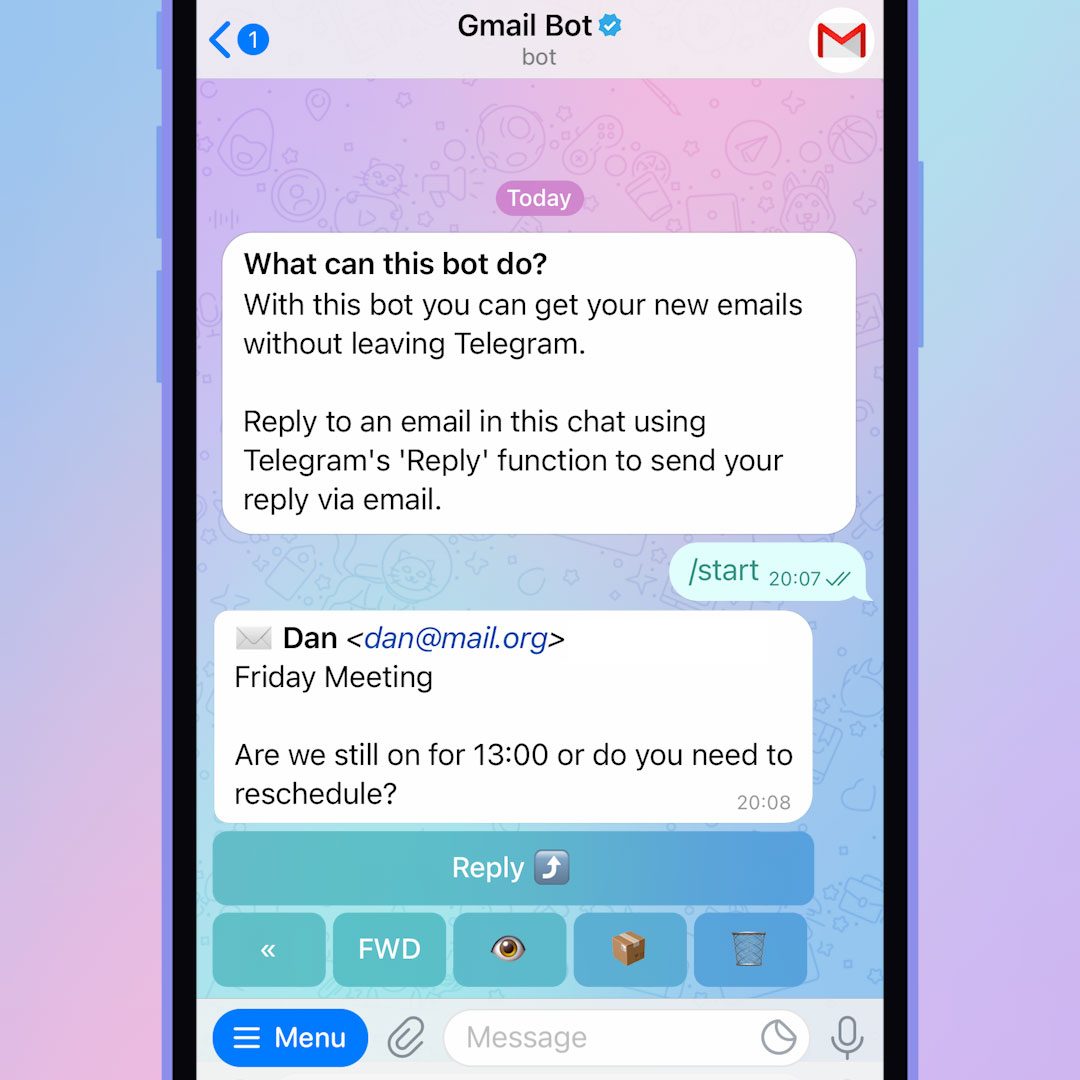
Chat with a Telegram bot with a menu of commands
The company's bot takes requests in a chat and the CRM sees each one with the client's name. Source: core.telegram.org ↗
Telegram app on a phone and a laptop
Managers reply from the CRM, and the client reads it in Telegram on any device. Source: telegram.org ↗

How to start

Three steps from a first message to work on your project.

  1. 01

    Leave a request

    Describe the task in the form — in text or by voice. Budget and timing are optional.

  2. 02

    We review and estimate

    A developer studies the brief, asks about anything unclear and sends an estimate.

  3. 03

    We start

    Once scope and price are agreed, the work begins.

or write to info@coreviaflow.space

Questions

Whose bot is it, and what if we stop working with you?
The bot is created under the company's own Telegram account, so its name, audience and history belong to the company. The access key can be replaced by the company in @BotFather at any time, and the bot's logic can be moved to another server. Nothing is tied to us.
Can clients keep writing to the owner's personal Telegram instead of a bot?
Yes, with Telegram Business. The owner connects the bot in the Business settings of his account, and the bot answers clients on his behalf from that same account; the owner sees everything and can step into any conversation. This works for the owner's account, not for every employee.
Can the bot send a mailing to all our clients?
To those who opened the bot at least once — a bot cannot write to a person who never started it. The mailing is sent in a stream because of Telegram's speed limits, so a few thousand recipients take minutes. The list and the text are prepared in the CRM and approved by the company before sending.
Do we need our own server for the bot?
The bot's logic has to live somewhere, because Telegram does not host bots. It can be the company's server, if there is one, or ours; the CRM itself is not enough. Either way the code and the settings are handed over to the company.

Tell us what needs to be connected

Describe the task in text or a voice message. We look at your setup and reply with a plan.