CoreviaFlowCOREVIAFLOWDIGITAL PROJECT COMPANY Leave a request
EN UA RU
Warehouse & DeliveryUA

Нова Пошта integration & automation

Express waybills created from the order itself, and delivery statuses that come back into the CRM on their own

Nova Poshta is the carrier most Ukrainian online stores ship through, and its business account exposes the same operations to software: creating an express waybill (EN), changing its details, ordering a redirect or a return, tracking statuses and building directories of cities, branches and parcel lockers. Corevia CRM uses exactly these operations, so a manager works with the order card while the waybill, the label and the delivery status are handled in the background.

What we connect

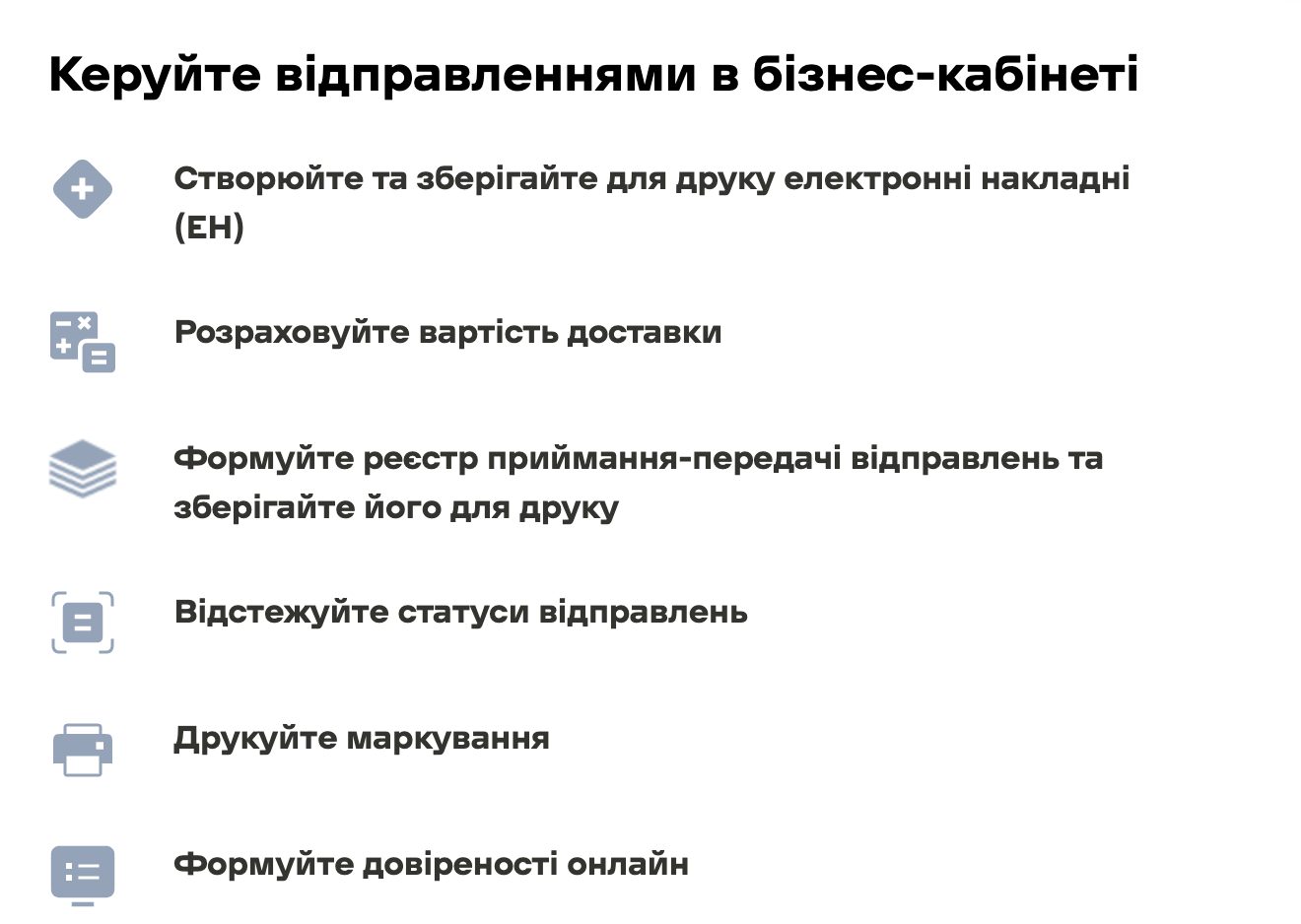
  • An express waybill (EN) is created from the data already in the order: recipient, city, branch or parcel locker, weight, number of places and who pays for delivery. Nothing is retyped in a second window.
  • The waybill number is stored in the order, and the shipment status is checked by that number: accepted at the branch, in transit, arrived, received, or being returned. The status is shown in the order card and moves the order along the pipeline.
  • The directory of cities, branches and parcel lockers is loaded from Nova Poshta, so in the checkout form or in the CRM the manager picks a real branch from a list instead of typing an address freehand.
  • If the client changes their mind, the waybill details are edited, a redirect is ordered or a return is requested from the same order card, without opening the business account separately.
  • Delivery cost is calculated before the waybill is created, so the manager can tell the client the figure while the order is still being confirmed.
  • Labels for the parcels are printed from the CRM, and the day's shipments are collected into an acceptance register for hand-over to the courier or at the branch.
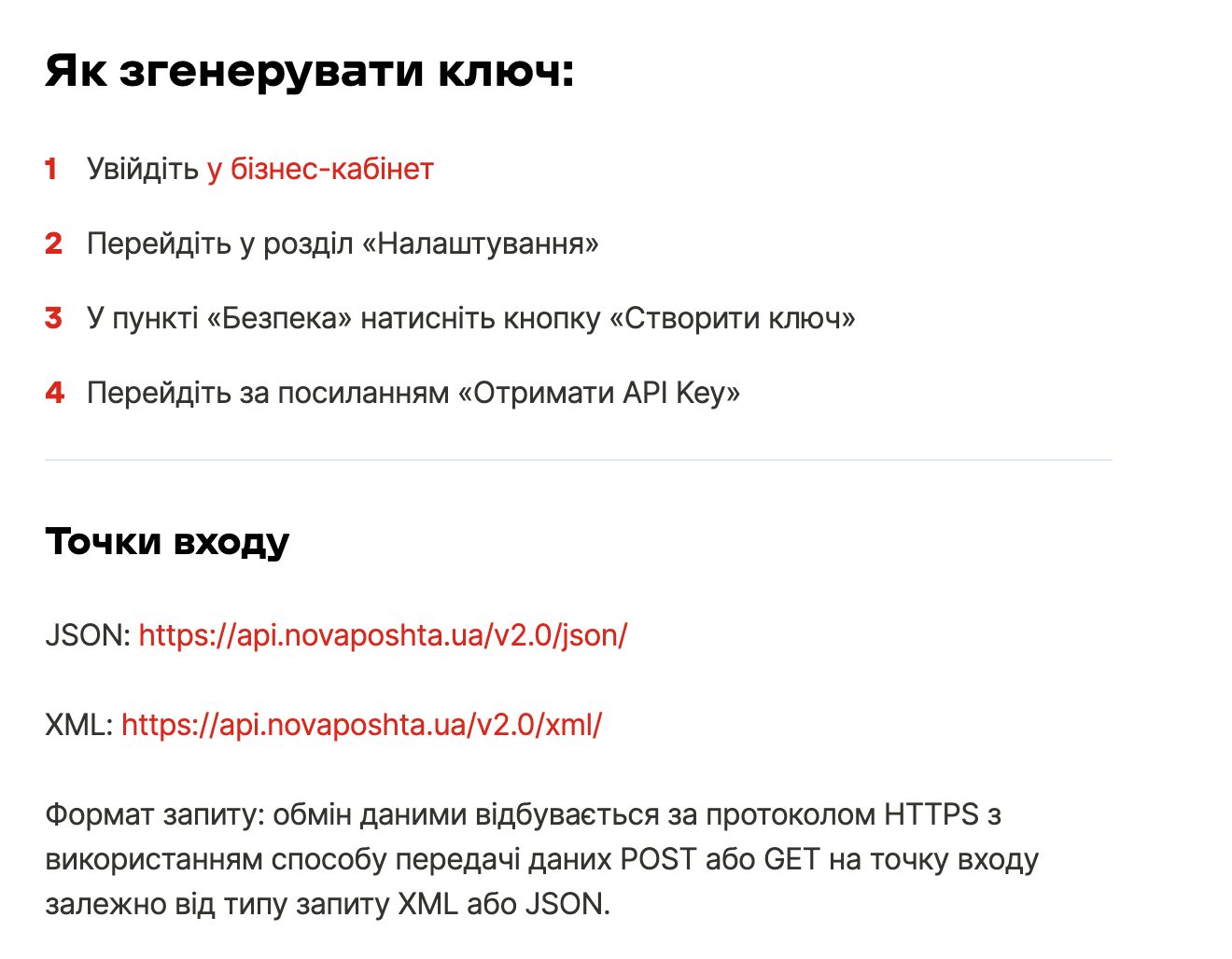
  • Access is set up with a key that the client generates in their own Nova Poshta business account under Settings → Security. It is stored in the CRM once and can be revoked by the client at any moment.

Automation scenarios

01

Ten orders confirmed, shipping day

Before the manager opens the business account, creates ten waybills one by one, copying the name, phone and branch from the CRM, and then pastes ten numbers back.

After the waybills are created from the order cards, the numbers are already in the orders, and the labels and the register are printed in one go.

02

The client asks where the parcel is

Before the manager finds the waybill number, checks it on the tracking page and replies by hand.

After the current status is already in the order card, and when the parcel arrives at the branch the client gets a message from the CRM.

03

The parcel was not picked up

Before nobody notices the parcel sitting at the branch until it comes back, and the order stays open for weeks.

After the storage status is visible in the order, the CRM raises a task for the manager, and a return or a redirect to another branch is ordered from the same card.

04

A wrong branch in the order

Before the client wrote the branch number by ear, the parcel went to the wrong side of the city, and the manager sorts it out by phone.

After the branch is chosen from the Nova Poshta directory during checkout, and if it still needs changing, the manager edits the waybill from the order.


How it works technically

For those who want to check: each point links to the official documentation page it comes from.

  • Nova Poshta's business pages describe automatic creation of an express waybill at the moment an order is placed on the site, plus editing the waybill, ordering a redirect and a return.

    Source: novaposhta.ua ↗ checked 2026-09-27
  • The API has two entry points, JSON and XML, and data is exchanged over HTTPS using POST or GET depending on the request type.

    Source: novaposhta.ua ↗ checked 2026-09-27
  • The API key is generated by the client in the business account: Settings → Security → Create key → Get API Key.

    Source: novaposhta.ua ↗ checked 2026-09-27
  • For websites Nova Poshta offers a widget that shows the current list of branches and parcel lockers and updates the data without the site owner's involvement.

    Source: novaposhta.ua ↗ checked 2026-09-27
  • Automating order processing through API integration and the accounting-system module is listed among the capabilities of business clients who have signed a contract with Nova Poshta.

    Source: novaposhta.ua ↗ checked 2026-09-27

Limits

The connection works on a business account with a signed service contract, which Nova Poshta lets you sign online with a digital signature; a private account without a contract is not enough. The full description of methods and models lives on a separate developer portal, and the vendor's pages we checked do not describe push notifications about status changes, so the CRM refreshes statuses by querying the waybill number on a schedule. The vendor's own delivery module for marketplaces currently covers only Prom.ua and Bigl.ua and runs in test mode, so it does not replace this connection.

Screenshots

Nova Poshta business account capabilities: create and print express waybills, calculate delivery cost, build an acceptance register, track shipment statuses, print labels
What the business account does Source: novaposhta.ua ↗
Nova Poshta instructions: four steps to generate an access key in the business account, and the JSON and XML entry points
Where the access key comes from Source: novaposhta.ua ↗

How to start

Three steps from a first message to work on your project.

  1. 01

    Leave a request

    Describe the task in the form — in text or by voice. Budget and timing are optional.

  2. 02

    We review and estimate

    A developer studies the brief, asks about anything unclear and sends an estimate.

  3. 03

    We start

    Once scope and price are agreed, the work begins.

or write to info@coreviaflow.space

Questions

Do we need a contract with Nova Poshta, or is a regular account enough?
A business account with a signed service contract is needed: the vendor lists order automation among the capabilities of contract clients. Nova Poshta lets the contract be signed online with a digital signature in the business account, and the access key is generated there too.
How quickly does the delivery status update in the order?
The CRM checks open waybills on a schedule and writes the new status into the order, because the vendor pages we checked do not describe notifications sent by Nova Poshta itself. The interval is set during setup, and a manager can refresh a single shipment manually at any time.
Can we send to a parcel locker, not only to a branch?
Yes. Branches and parcel lockers come from the same Nova Poshta directory, so the client or the manager picks either one, and the waybill is created with that point as the destination.
We already ship through the business account. What changes?
The business account stays as it is: the same waybills, register and reports are still there. What changes is where the manager works: the waybill is created and tracked from the order card, so the CRM and the business account show the same shipment without copying numbers between them.

Tell us what needs to be connected

Describe the task in text or a voice message. We look at your setup and reply with a plan.