CoreviaFlowCOREVIAFLOWDIGITAL PROJECT COMPANY Leave a request
EN UA RU
E-commerce platformsEU

OpenCart integration & automation

An order from your OpenCart store appears in the CRM within minutes, the manager calls the customer with the full cart in front of them, and the delivery status goes back to the store on its own.

OpenCart is a popular open-source store platform: a catalogue, orders, customers, several stores under one admin panel, extensions for payments and delivery. Sales, however, usually happen outside the store — in a CRM, on the phone, in messengers — and orders are copied there by hand. CoreviaFlow connects OpenCart to your CRM so that a new order lands with the manager on its own, the customer's card is shared, and statuses return to the store without retyping.

What we connect

  • We check which OpenCart you run: the documentation covers version 4.x, and a store on 3.x is connected differently or upgraded first — we decide this together before promising anything.
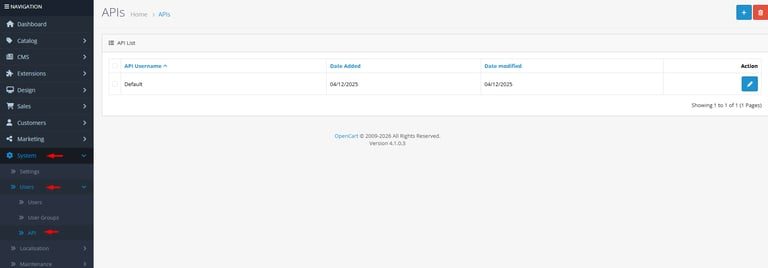
  • Your administrator creates an access key for our connection in the admin panel (in the section System → Users) and limits it to the address of our server. The key is shown once, so it is handed over right away; no one's personal login is involved.
  • Together we decide what travels: new orders and their statuses to the CRM, delivery statuses back to the store, customers in both directions, and — if needed — balances and prices from your accounting system.
  • OpenCart does not report a new order to outside systems by itself. Either we add a small extension to the store that sends a notice on each event (order placed, status changed), or the CRM checks the store on a short schedule — we choose with you depending on how many orders you get.
  • We match the fields: order statuses, payment and delivery methods, customer groups, product codes, and — if you have several stores under one panel — which store each order came from.
  • We test on a few real orders next to your current process, then switch the team over and keep watching: if the store refuses a record, the responsible person gets a notice with the reason.

Automation scenarios

01

A new order becomes a deal in the CRM

Before the manager refreshes the store admin panel all day and copies orders into the CRM, and the evening orders are noticed the next morning.

After an order placed in the store appears in the CRM within minutes with the customer, the items, the address and the payment method; the manager calls right away.

02

The delivery status goes back to the store

Before the parcel has been sent, but the store still says 'processing', and the customer writes to ask.

After when the CRM marks the order shipped or delivered, the status changes in the store as well, and the customer sees it in their account.

03

One customer card instead of two

Before the person who calls is a stranger to the manager, although they have ordered from the store four times.

After the store customer is matched to the CRM card by phone and email, and the manager sees the whole history — orders, returns, complaints — before picking up the phone.

04

Balances and prices from accounting to the store

Before the store keeps selling an item that ran out, and the manager has to call and apologise.

After balances and prices come from your accounting system to the store on a schedule, and a sold-out item leaves the storefront before anyone orders it.


How it works technically

For those who want to check: each point links to the official documentation page it comes from.

  • In the admin panel (System → Users → APIs) OpenCart creates credentials for outside applications — inventory systems, ERP, mobile apps and other services.

    Source: docs.opencart.com ↗ checked 2026-09-28
  • Each API key has configurable access restrictions and a usage history for security monitoring.

    Source: docs.opencart.com ↗ checked 2026-09-28
  • OpenCart 4.x is built on an event system that lets developers extend and change behaviour without touching the core.

    Source: docs.opencart.com ↗ checked 2026-09-28
  • Extensions add modules, payment gateways, shipping methods, themes and reports without editing core files.

    Source: docs.opencart.com ↗ checked 2026-09-28
  • Multi-store: several stores are managed from one admin panel, with any currency and automatic rate updates.

    Source: www.opencart.com ↗ checked 2026-09-28

Limits

Access to the store is granted through an API key created in the admin panel, and OpenCart itself recommends restricting each key to specific IP addresses — the server that connects must therefore have a static address. The generated key is shown only once; after saving it cannot be viewed again and has to be reissued if lost. The event system of OpenCart 4.x runs as code inside the store: handlers are functions in the store's own files, so there is no ready-made outgoing notification to outside systems — a small extension has to be added, or the CRM checks the store on a schedule. Extensions are written for OpenCart 4.x (its MVC-L pattern, events and OCMOD), which means development in PHP; a store on version 3.x is a separate case with its own upgrade path.

Screenshots

OpenCart admin panel: list of API access keys
The API keys page in the OpenCart admin panel: your administrator creates a separate key for the CRM connection here and can limit it to our server's address. Source: docs.opencart.com ↗
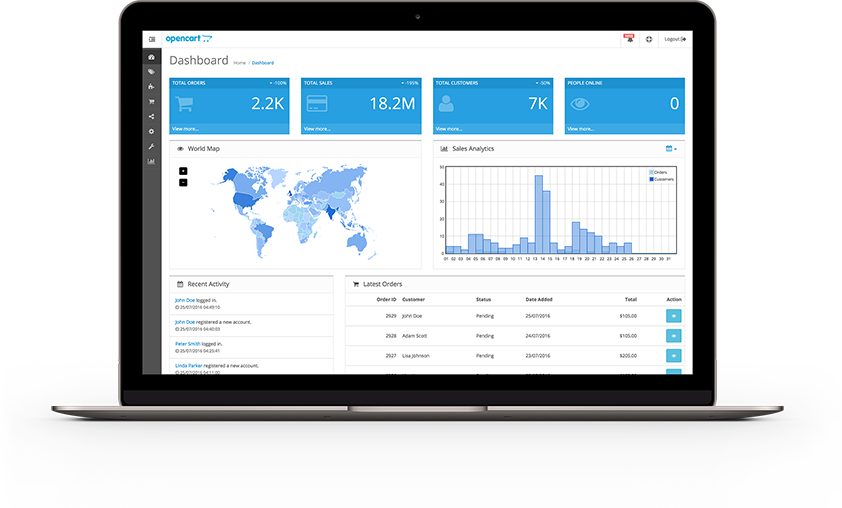
OpenCart admin dashboard with orders, customers and sales map
The OpenCart admin dashboard: the orders and customers shown here are what the CRM connection carries over to the manager's screen. Source: www.opencart.com ↗

How to start

Three steps from a first message to work on your project.

  1. 01

    Leave a request

    Describe the task in the form — in text or by voice. Budget and timing are optional.

  2. 02

    We review and estimate

    A developer studies the brief, asks about anything unclear and sends an estimate.

  3. 03

    We start

    Once scope and price are agreed, the work begins.

or write to info@coreviaflow.space

Questions

Our store is on OpenCart 3. Can you connect it?
The official documentation describes version 4.x, so for a store on 3.x we first look at how it is set up and which extensions it uses, and then decide together: connect it as it is or upgrade first. We do not promise specifics before that look.
Will you need to change the store's code?
The core stays untouched. If the store has to report events on its own, we add a small separate extension — the way OpenCart is designed to be extended — and it can be removed at any time without affecting the store.
Is it safe to give an outside system access to the store?
Access goes through a separate key that your administrator limits to our server's address and can switch off in one click. The panel keeps a history of every call made with the key, so you always see what the connection did.
We have several stores under one OpenCart. Which one gets connected?
Any of them or all at once. The CRM keeps the store on each order and customer, so the manager knows which brand the person bought from and answers accordingly.

Tell us what needs to be connected

Describe the task in text or a voice message. We look at your setup and reply with a plan.