CoreviaFlowCOREVIAFLOWDIGITAL PROJECT COMPANY Leave a request
EN UA RU
Automation & workspaceUS

Zapier integration & automation

Zapier links your services without code: we set up the links, or replace them with our own code when there are too many steps

Zapier is the glue between online services: when something happens in one app, Zapier performs the next step in another, and nobody writes code. If your company already runs on Zapier, we build and tidy up the links between forms, CRM, mailing, payments and spreadsheets so they stop breaking and duplicating data. When a link has too many steps, needs branching logic or runs into the task limit of your plan, we replace it with our own small service, and everything else in your Zapier setup keeps working as before.

What we connect

  • Website forms and ad leads: a new request becomes a contact and a deal in HubSpot, Pipedrive, Salesforce or ActiveCampaign, and the manager gets a message.
  • Payments: a successful Stripe payment marks the deal as paid, creates the invoice in Xero and adds the customer to the right Mailchimp list.
  • Spreadsheets and messengers: a new row in Google Sheets, a task in monday and a note in Slack or Telegram appear from the same event.
  • Services that Zapier does not list, such as Ukrainian CRMs and delivery services: we send their events to Zapier's built-in inbox address for incoming signals, and the link continues from there.
  • Audit of existing links: we go through what runs in your account, remove duplicates and dead steps, add checks and error alerts so a broken link does not stay silent for a week.
  • Your own product inside Zapier: we build a connector for your service through Zapier's developer tools so your customers can link it to the apps they already use.
  • Replacing Zapier with code: when a link eats too many tasks or needs logic that a chain of steps cannot express, we rewrite it as our own service and leave everything else in your Zapier as is.

Automation scenarios

01

A lead from the website reaches the CRM and the manager

Before requests from the form land in a mailbox, someone copies them into the CRM in the evening, and part of them is answered a day late.

After the moment the form is sent, Zapier creates the contact and the deal in the CRM, adds a row to the spreadsheet and sends the manager a message with the customer's name and question.

02

A payment closes the deal and opens the paperwork

Before the accountant checks Stripe by hand, the manager changes the deal stage by hand, and the welcome email goes out when someone remembers.

After a successful payment moves the deal to paid, creates the invoice in Xero, adds the customer to the Mailchimp list and starts the welcome series without anyone touching it.

03

A Ukrainian service that Zapier does not know about

Before orders live in a Ukrainian CRM that is missing from Zapier's catalogue, so the sales links built for foreign tools do not see them at all.

After the CRM sends each new order to Zapier's inbox address for incoming signals, and the same links that already serve HubSpot or Pipedrive pick it up: spreadsheet, messenger, mailing.

04

Zapier has become too small for the task

Before one link with a dozen steps eats most of the monthly task allowance, runs are held until the next month, and every new condition means one more fragile step.

After this one link is rewritten as our own service that does the whole chain in a single run, while the simple links stay in Zapier and the task limit is no longer a problem.


How it works technically

For those who want to check: each point links to the official documentation page it comes from.

  • A Zap is a workflow that connects apps to automate repetitive tasks; it consists of a trigger that starts it and one or more actions performed afterwards.

    Source: help.zapier.com ↗ checked 2026-09-27
  • There are two types of triggers: polling, where Zapier periodically asks the app for data, and instant, where the app sends data itself via webhooks as each event occurs; the polling interval depends on the Zapier plan.

    Source: help.zapier.com ↗ checked 2026-09-27
  • The built-in Webhooks by Zapier module receives automated messages from other apps; its Catch Hook trigger returns the incoming data already parsed into fields.

    Source: help.zapier.com ↗ checked 2026-09-27
  • A task is counted each time an action step runs successfully; trigger, filter and certain built-in steps do not count. Each plan includes a monthly task allowance, and when it is reached, runs are held, not lost, and can be replayed later.

    Source: help.zapier.com ↗ checked 2026-09-27
  • Zapier Platform lets you build your own integration: the Platform UI in the browser without code using API endpoint URLs, or the CLI in a local environment with version control and command-line releases.

    Source: docs.zapier.com ↗ checked 2026-09-27
  • In a custom integration, a polling trigger periodically checks the given API endpoint for new or updated data, while a REST Hook trigger requires the app to support webhook subscriptions.

    Source: docs.zapier.com ↗ checked 2026-09-27

Limits

Zapier counts a task every time an action step runs successfully, and each plan includes a monthly allowance; a long link with many steps spends several tasks per event, and once the allowance is used up, runs are held until tasks are available again. Most triggers are polling triggers: Zapier asks the app for new data at an interval that depends on the plan, so a link may react with a delay of minutes rather than seconds; instant reaction is possible only where the app itself sends events. Some services, including Ukrainian CRMs and delivery services, may be missing from Zapier's catalogue; they are connected through the built-in inbox for incoming messages, which has its own size limit per message. Branching logic, retries and data clean-up are possible in Zapier but quickly turn into fragile chains; that is the point where we suggest our own code instead. Links run in your Zapier account, under your plan, and access to each connected app is granted by you.

Screenshots

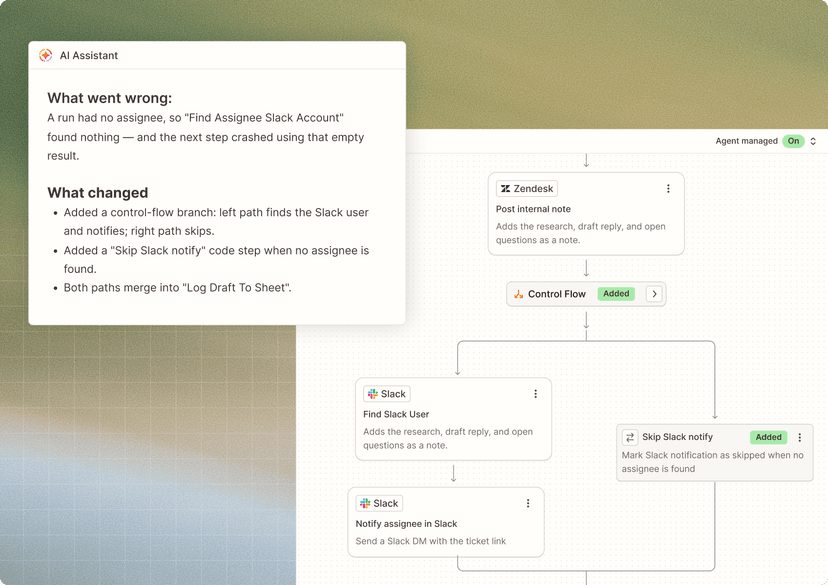
Zapier editor: a Zap with a branch, where a Zendesk ticket leads either to a Slack notification or to a skip step, and the assistant explains what was changed
A link with a branch in the Zapier editor Source: zapier.com ↗
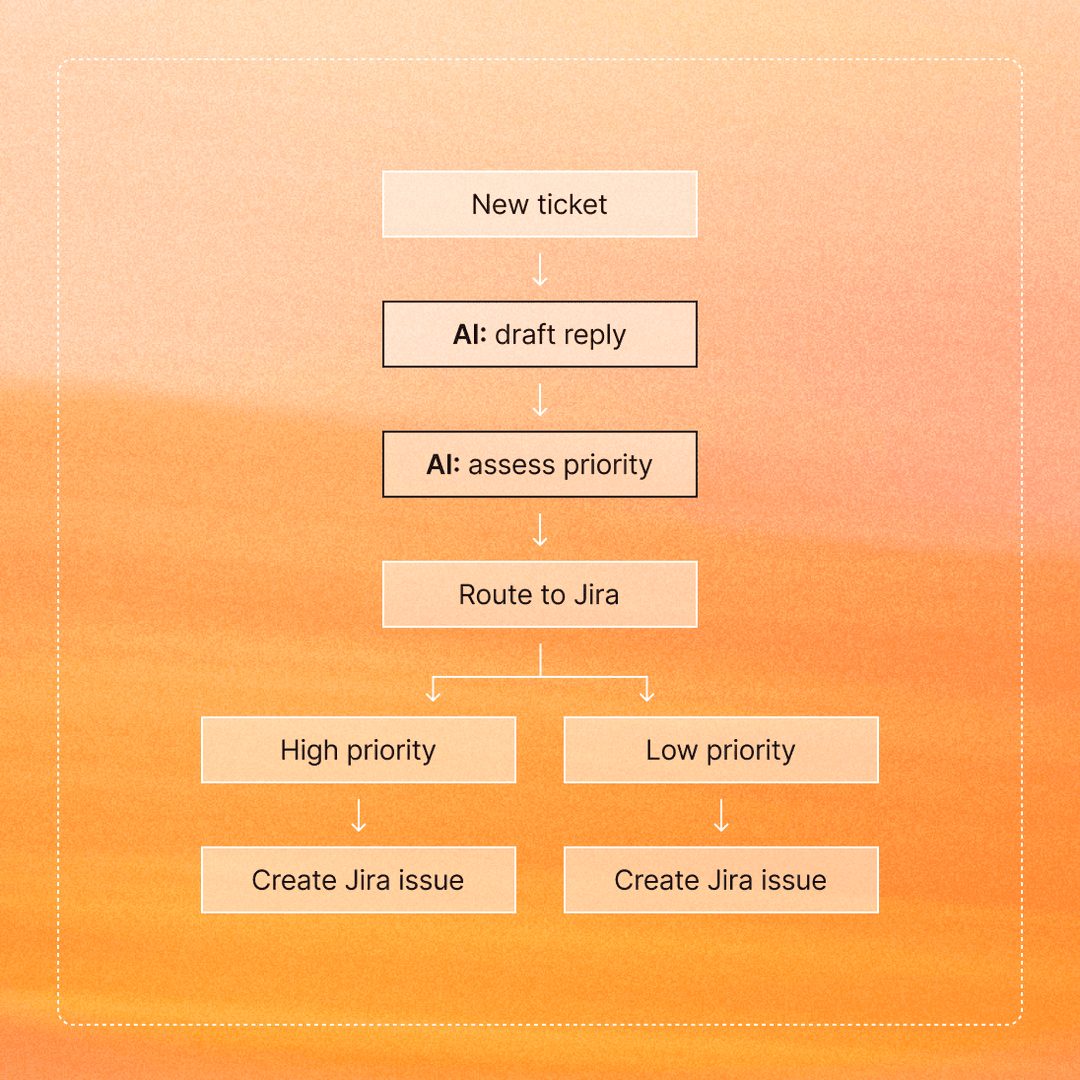
Scheme of a Zap: a new ticket goes through AI steps, is routed by priority and ends as a Jira issue on either branch
From event to action: how a Zap is built Source: zapier.com ↗

How to start

Three steps from a first message to work on your project.

  1. 01

    Leave a request

    Describe the task in the form — in text or by voice. Budget and timing are optional.

  2. 02

    We review and estimate

    A developer studies the brief, asks about anything unclear and sends an estimate.

  3. 03

    We start

    Once scope and price are agreed, the work begins.

or write to info@coreviaflow.space

Questions

Do we need our own Zapier account?
Yes. The links live in your account and run on your plan, and the connected apps are authorised by you. We work inside it with the access you grant, so you can see every link and switch any of them off at any moment.
Our CRM or delivery service is not in Zapier. Is that a dead end?
No. Zapier has a built-in inbox address for incoming messages from any service, and the data arrives already split into fields. We teach your service to send its events there, or put a small service of ours in between when the other side cannot send anything itself.
How quickly does a link react to an event?
It depends on the app. Some apps send the event to Zapier themselves, and the link starts at once. Most apps are checked by Zapier on a schedule, and the interval between checks depends on your plan, so expect minutes rather than seconds. Where seconds matter, we bring the event in through the inbox address or move that step to our own code.
When is it better to drop Zapier and write code?
When one link eats a large share of the monthly task allowance, when the logic needs conditions, loops and retries that turn into a dozen fragile steps, or when an error in the middle of the chain must not leave half-done records. In that case we rewrite that particular link as our own service and keep the simple ones in Zapier.

Tell us what needs to be connected

Describe the task in text or a voice message. We look at your setup and reply with a plan.